 |
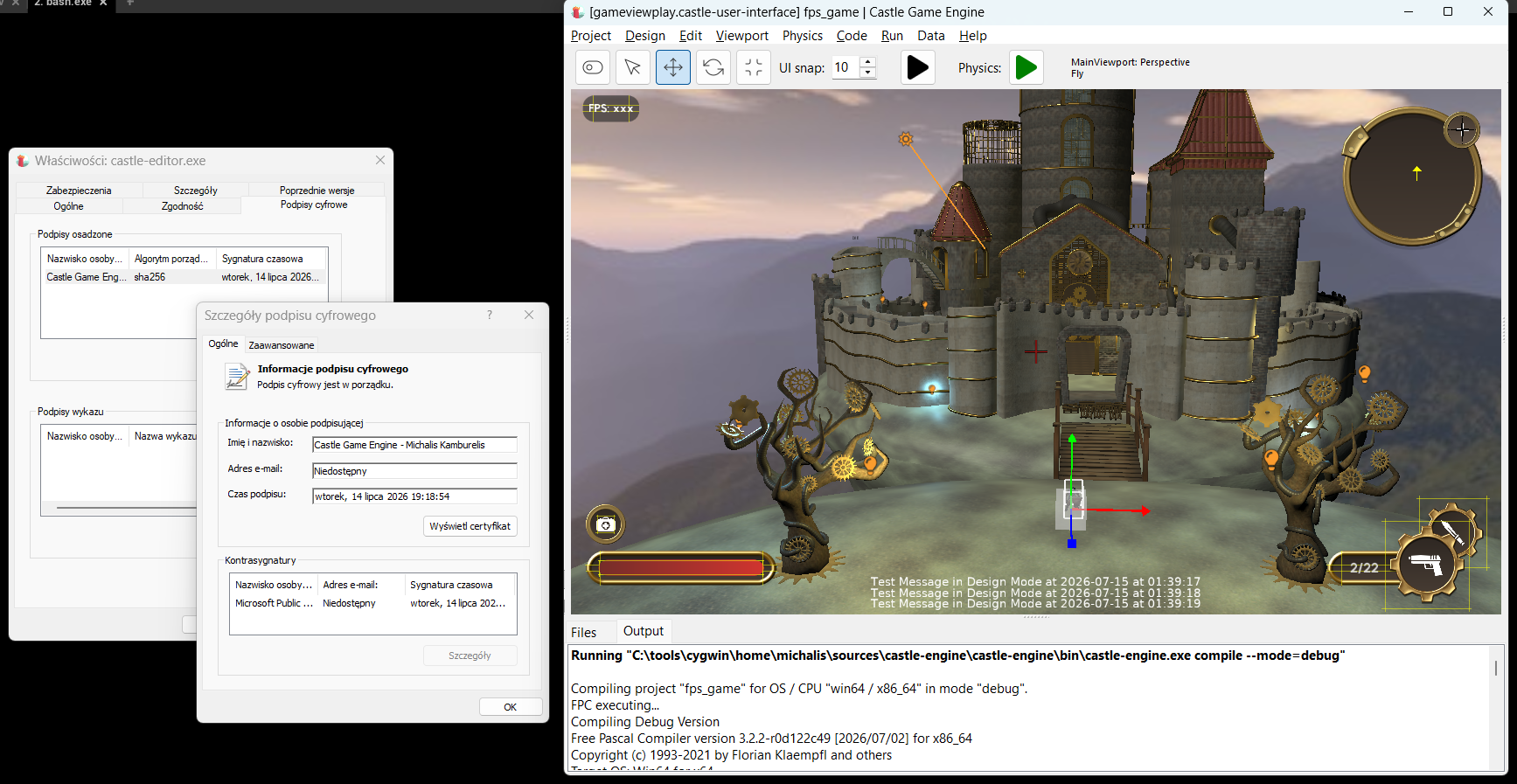
Our downloads for Windows include now all the executables code-signed, which means that they are trusted and running the engine will raise fewer alarms from various Windows protection tools. In particular, “Smart App Control” (mentioned also in past news) will no longer block us, randomly preventing you from running compilers or your applications. This applies to all our downloads, including the automatic snapshots made after every commit+push.
We have also decreased a bit the size of our downloads, thanks to a small de-duplication fix and using more compressed formats for some systems (tar.xz for Linux, 7z for Windows).
Let this also be an occasion to ask for your support on Patreon. Your support really matters, enabling me to spend more time working on the engine. Our “infrastructure costs” are rising — the signing, employed now, will cost us an extra 120 USD / year (this comes on top of Apple membership costs, servers costs, domains etc., and on top of my cost of living 🙂 ).
That was the short version of the news 🙂
What follows is a detailed description of how / why we did the signing. I hope it is interesting, in particular if you wonder how to code-sign on Windows yourself, but admittedly there’s a lot of “gory” details below. Read on if you’re brave!
Various solutions to sign on Windows
We have done a lot of research about how / which signing solution to use:
- I rejected usage of Certum certificates. They are cheap, but using them with CI requires quite some hack with Docker executing GUI application inside. I don’t believe this will be maintainable for a long-run, as we try to use it also for CI builds.
-
I had high hopes but in the end resigned from using SignPath Foundation for OSS projects. It’s a great initiative for open-source projects, “SignPath Foundation” can provide you with tools and sign your executables for free. However, it wasn’t a fit for us:
- The process puts some constraints how we can use signing, in particular it is not allowed to sign 3rd-party tools (this means bundled FPC in our case) we ship with our engine. See their terms.
-
It also has additional constraints: “Every release needs manual approval for signing.”, signing 48 GB / year. So it’s not really for CI snapshots, only for “real” stable releases (which we should do more often, but that’s another story 🙂 ).
-
It would also practically tie us to GitHub, since their Trusted Build Systems for OSS support only GitHub Actions or AppVeyor, you cannot build anywhere else. And I want to avoid being limited to only these 2 CI systems — I like Codeberg more and more, and GitHub less and less and I want to keep our migration options open 🙂
-
I eventually settled on Azure Artifact Signing (formerly known as Azure Trusted Signing), a signing service straight from Microsoft.
- It costs (10 USD / m) but it gives us the flexibility we need.
-
Tooling is really good and cross-platform. One can build any script on top of Windows
signtoolor cross-platform jsign. -
We can sign everything — engine tools, and compiler we use.
-
It’s really well made to work in CI. The way Azure Login works with OIDC (OpenID Connect) was new to me, and really cool. It took some time to understand and set up… but the end result is really nice. It means that CI system (which can be GitHub, but also Forgejo implements OIDC workload identity federation) creates a token, authenticating that this is a particular project on a particular branch. There’s no need to establish/exchange any secret (that would be an attack possibility on our Azure account) to make signing work from CI.
-
Note: this is not available for individuals outside US/Canada, but luckily I’m a company in Poland so we are eligible for it.
All in all, we have a reliable system, and you shall see all our executables on Windows signed by “Castle Game Engine – Michalis Kamburelis”.
Our scripts to sign in castle-build-ci
Our castle-build-ci repository has now bash scripts to perform signing using Azure Artifact Signing. You’re welcome to use them too, they are generic and documented in castle-build-ci/windows.
As with Apple signing scripts (already done in the past), I decided to design this as bash scripts (portable to all systems, including Windows, and of course all Unix like Linux, FreeBSD, macOS). This is in contrast to using ready GitHub Actions for signing, like this one. Why bash scripts? I explained the reasons in detail here, in short:
- Having this as bash script is more powerful: can be used in the middle of another bash script. And can be passed as InnoSetup command to sign uninstaller too.
-
bash script can be tested on a local system, i.e. I can just use the same scripts to sign locally, not in CI. I found this to be a great help when debugging — I don’t need to wait for GitHub Actions to perform first test of the scripts.
-
It keeps us more independent from GitHub Actions, which is desirable for me, as I’m really looking forward to jump to Codeberg, and we already test their Woodpecker CI. Forgejo Actions may also be a viable option at some point. I do not want to depend on GitHub for our engine existence.
Signing everything!
FPC builds from castle-fpc are now signed, on both macOS and Windows.
Lazarus builds from castle-lazarus are now signed too, on both macOS and Windows. We don’t bundle it with CGE for now, but it’s ready.
Our Castle Game Engine releases are now signed, by our pack_release.sh script (controlled by GitHub Action workflows). Everything is signed:
- All our tools are signed (
castle-engine,castle-editor,castle-model-viewer…). - Installer and uninstaller are signed.
pasls(LSP for VS Code and other editors) is signed.- And bundled FPC is signed, as mentioned above.
Finally, standalone snapshot releases of our viewers are also signed:
The tests confirm this is now good and makes Windows happy. I can install our engine, run editor, see detected (bundled) FPC version, create new project, build it and run — and everything works even with the dreaded “Smart App Control” turned “On”.
Our Pascal Language Server, used by VS Code / VS Codium extension also works without any fuss, as it is also signed.
Size optimizations
We also did some size optimizations, since we’re aware the engine downloads are big, and we’re looking for ways to trim them down (ideally: still keeping examples as part of default downloads).
- We found and removed duplicated binaries of our tools. These needlessly inflated download size by 40-70 MB (depending on system) — fixed now.
-
We added alternative archives compressed by 7z (for Windows) and tar.xz (for Linux). These have much smaller sizes than simple zip, lowering download size by ~250 MB (for tar.xz) and even 300+ MB (for 7z). No loss of functionality, just better compression!
- So, we will continue to provide zip versions, for maximum compatibility…
- but our default downloads now lead to smaller tar.xz on Linux.
- (On Windows, we still lead to InnoSetup installer, which is already a better compression than plain zip.)
- We also removed “non bundled” download archives, because maintaining them was becoming too much work, our GHA scripts were getting quite complicated. They were only available for 2 platforms (win64/x86_64 and linux/x86_64) and the size gain from not bundling FPC was < 100 MB after above optimizations.
Thank you!
Woah. This was a big infrastructure change, to make all our Windows stuff signed. Enjoy!
And if you like what we do, and like our long news posts :), please support us on Patreon.

Start the discussion at Castle Game Engine Forum